> ## Documentation Index
> Fetch the complete documentation index at: https://docs.elasticfunnels.io/llms.txt
> Use this file to discover all available pages before exploring further.
# AI credits
> What AI credits pay for, how the monthly allowance and purchased credits work, and how to buy more.
AI features in ElasticFunnels run on AI credits. One credit covers \$0.002 of AI model usage, so a short edit costs a few credits and a long multi-page build costs more.
## What uses credits
Credits are spent when ElasticFunnels' own AI does the work for you, for example:
* the AI editor and the AI agent that builds and edits pages
* generating and modifying pages, components and prelanders
* the AI quiz builder and AI translations
* generating images for kits ([Kit images](/template-kits/kit-images))
* AI replies and suggestions elsewhere in the app
Each request is charged for what it actually used: the AI model it ran on and how much text or how many images it produced.
If a feature runs on **your own API key** (an AI integration you connected with your own provider account), it uses no credits. Your provider bills you directly.
## Monthly credits and purchased credits
Your balance has two parts.
 | Part | How it works |
| - | - |
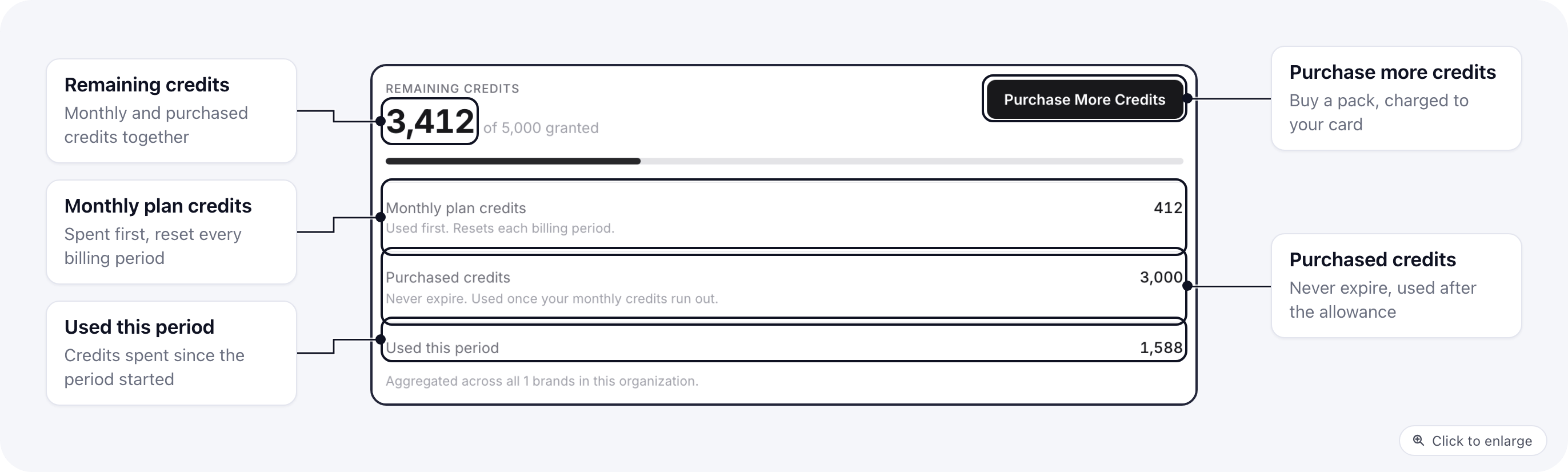
| **Monthly plan credits** | Included with some plans. They reset at the start of every billing period, and anything left over at the end of a period does not carry over. |
| **Purchased credits** | Credits you bought in a pack. They **never expire** and stay on your account until you use them. |
Monthly plan credits are always spent first. Purchased credits are used only once the monthly credits for the period run out, so a pack you bought keeps its value when your plan renews.
**Remaining credits** at the top is both parts added together. **Used this period** counts what was spent since the current billing period started.
If your brand is billed through an organization, every brand in the organization shares one balance. You see it under **Organization Billing**, on the **AI Credits** tab.
## Buy more credits
1. Open **Billing** and go to the **AI Credits** tab. For a brand billed through an organization, open **Organization Billing** instead.
2. Click **Purchase More Credits**.
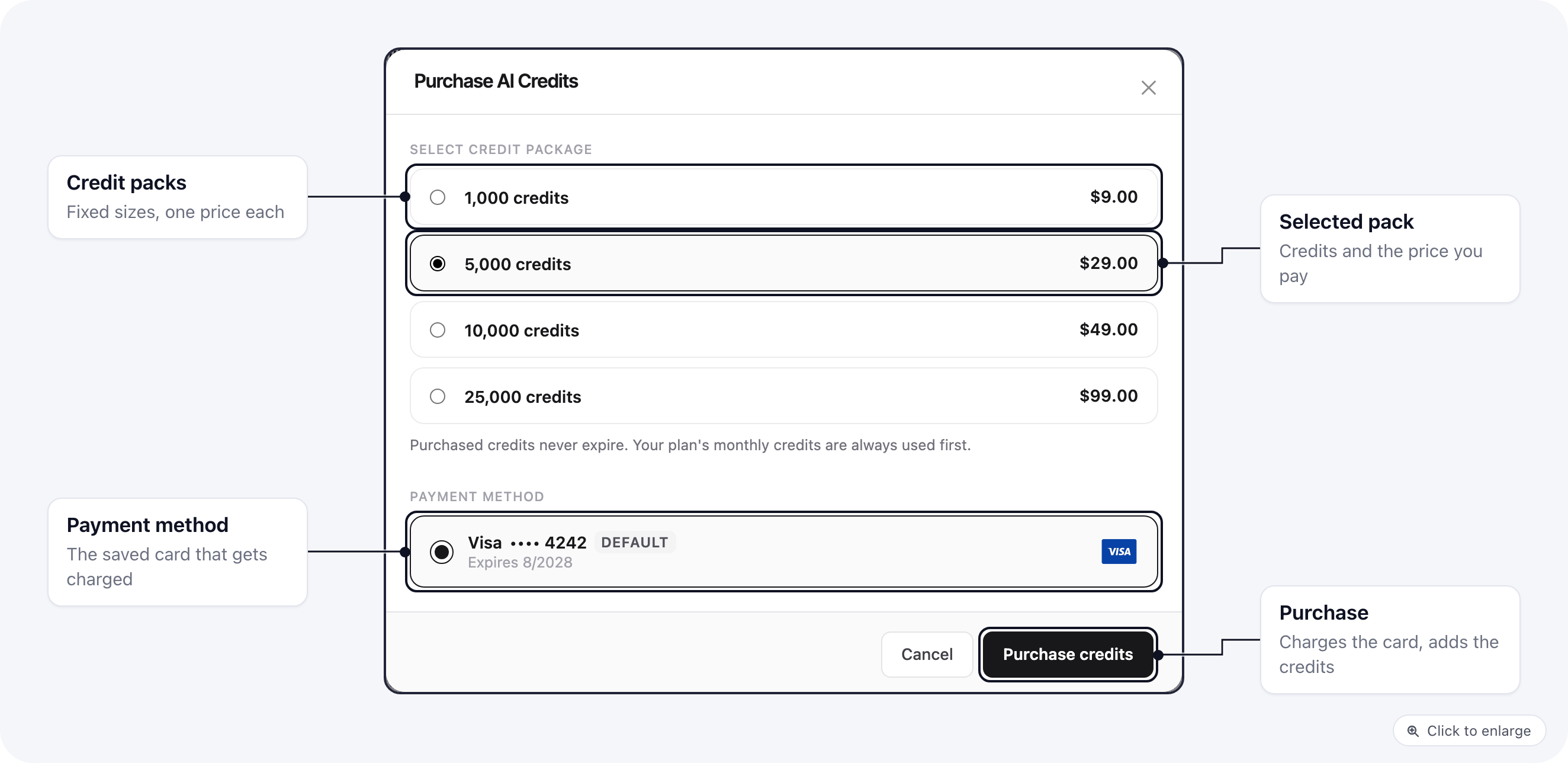
3. Pick a pack and the card to charge, then click **Purchase credits**.
| Part | How it works |
| - | - |
| **Monthly plan credits** | Included with some plans. They reset at the start of every billing period, and anything left over at the end of a period does not carry over. |
| **Purchased credits** | Credits you bought in a pack. They **never expire** and stay on your account until you use them. |
Monthly plan credits are always spent first. Purchased credits are used only once the monthly credits for the period run out, so a pack you bought keeps its value when your plan renews.
**Remaining credits** at the top is both parts added together. **Used this period** counts what was spent since the current billing period started.
If your brand is billed through an organization, every brand in the organization shares one balance. You see it under **Organization Billing**, on the **AI Credits** tab.
## Buy more credits
1. Open **Billing** and go to the **AI Credits** tab. For a brand billed through an organization, open **Organization Billing** instead.
2. Click **Purchase More Credits**.
3. Pick a pack and the card to charge, then click **Purchase credits**.
 | Pack | Price |
| - | - |
| 1,000 credits | \$9 |
| 5,000 credits | \$29 |
| 10,000 credits | \$49 |
| 25,000 credits | \$99 |
Your card is charged right away and the credits are added once the payment goes through. If the payment fails, nothing is added. Only these pack sizes can be bought. You need a saved card first: add one on the **Payment Cards** tab.
Credits bought for a brand that is billed through an organization go into the organization's shared balance.
## When credits run out
When both your monthly and purchased credits are used up, AI features that need credits stop working until you buy a pack or your next billing period adds your monthly credits. Features running on your own API key keep working.
This documentation is built and hosted on [Mintlify](https://mintlify.com), a developer documentation platform.
| Pack | Price |
| - | - |
| 1,000 credits | \$9 |
| 5,000 credits | \$29 |
| 10,000 credits | \$49 |
| 25,000 credits | \$99 |
Your card is charged right away and the credits are added once the payment goes through. If the payment fails, nothing is added. Only these pack sizes can be bought. You need a saved card first: add one on the **Payment Cards** tab.
Credits bought for a brand that is billed through an organization go into the organization's shared balance.
## When credits run out
When both your monthly and purchased credits are used up, AI features that need credits stop working until you buy a pack or your next billing period adds your monthly credits. Features running on your own API key keep working.
This documentation is built and hosted on [Mintlify](https://mintlify.com), a developer documentation platform.