> ## Documentation Index
> Fetch the complete documentation index at: https://docs.elasticfunnels.io/llms.txt
> Use this file to discover all available pages before exploring further.
# Delivery Events
> Get opens, clicks, bounces and complaints back from Amazon SES, Postmark, Brevo and Resend, and see where they show up.
A delivery event is the provider telling ElasticFunnels what happened to an email after it left:
it was delivered, opened, clicked, bounced, marked as spam, or the person unsubscribed. Postmark,
Brevo, Resend and Amazon SES report these through a webhook on your account. Each account's page
has a **Delivery events** card that shows whether its webhook is on.
## What each event changes
| Event | Campaign email | Any other email | Suppression list |
| - | - | - | - |
| Delivered | Counted in the campaign report | Email log updated | |
| Opened | Counted in the campaign report | Email log updated | |
| Clicked | Counted with the link, and counted as an open too | Email log updated | |
| Hard bounce | Counted, with the reason | Email log updated | Address added |
| Spam complaint | Counted | Email log updated | Address added |
| Unsubscribe (Postmark, Brevo) | Counted | Email log updated | Address added |
| Soft bounce, blocked, failed | The reason is saved on that recipient | Email log updated | Not added |
* **Campaign reports** count people, so a person who opens a campaign five times counts once.
A click counts as an open too, for readers whose mail app blocks the open pixel.
* **Email logs** are under **Settings → Logs → Email Logs**. See
[Emails Not Sending](/emails/troubleshooting#start-with-the-email-log).
* **Suppression list**: campaigns skip every address on it. See
[Transactional emails and campaigns](/emails/overview#transactional-emails-and-campaigns).
Providers retry webhooks, so the same event can arrive twice. ElasticFunnels counts it once.
## Postmark, Brevo and Resend: added when you save
When you save one of these accounts, ElasticFunnels adds the webhook to your provider account for
you:
* **Postmark**: one webhook on each message stream, transactional and broadcast.
* **Brevo**: one transactional webhook for delivered, bounces, blocked, spam, invalid address,
opened, click and unsubscribed.
* **Resend**: one webhook for delivered, bounced, complained, opened, clicked, failed and
suppressed. This needs a full access API key.
Saving again never adds a second webhook: the one that points at ElasticFunnels is updated. Every
event is checked with a secret that belongs to that account, and events that fail the check are
refused.
The **Delivery events** card then shows one of these:
| Status | What to do |
| - | - |
| **On.** This account reports opens, clicks, bounces and complaints | Nothing |
| The webhook could not be added | Read the provider's reply under it, fix the cause, and save again |
| This API key can send email but cannot manage webhooks | Resend only. See below |
| Not set up yet | Save the account |
**Accounts connected before 18 October 2026 have no webhook yet.** Open the account and click
**Save** once. Nothing else changes.
A failed webhook never blocks saving the account: email still goes out, only the events are
missing.
### Resend with a sending-only key
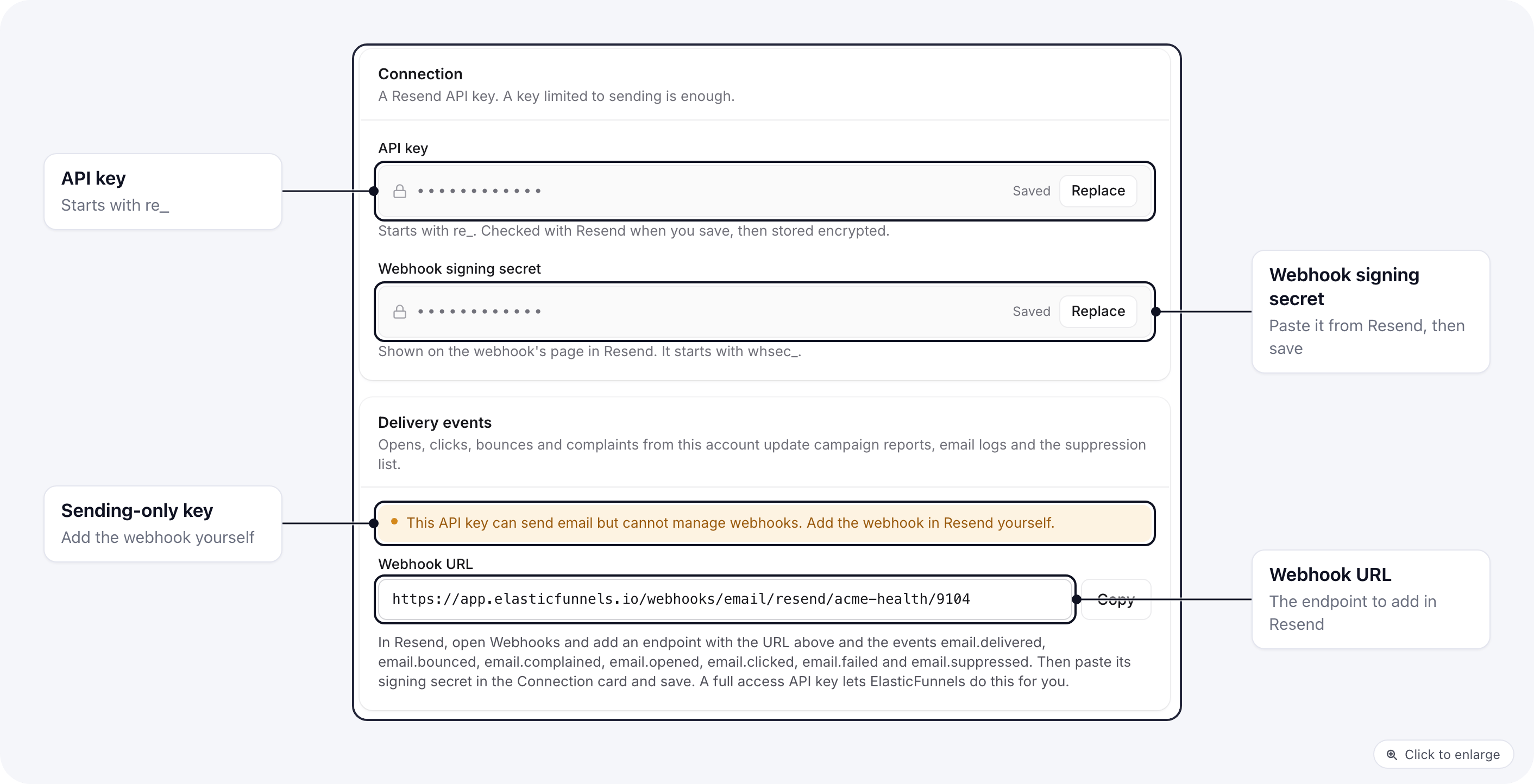 A Resend key limited to sending cannot create webhooks. The card then shows the webhook URL and a
**Webhook signing secret** field:
1. In Resend, open **Webhooks** and add an endpoint with the URL from the card.
2. Pick the events `email.delivered`, `email.bounced`, `email.complained`, `email.opened`,
`email.clicked`, `email.failed` and `email.suppressed`.
3. Copy the webhook's signing secret (it starts with `whsec_`), paste it in
**Webhook signing secret** and save.
Or replace the key with a full access key and save: ElasticFunnels then adds the webhook itself.
## Amazon SES: three steps in AWS
A Resend key limited to sending cannot create webhooks. The card then shows the webhook URL and a
**Webhook signing secret** field:
1. In Resend, open **Webhooks** and add an endpoint with the URL from the card.
2. Pick the events `email.delivered`, `email.bounced`, `email.complained`, `email.opened`,
`email.clicked`, `email.failed` and `email.suppressed`.
3. Copy the webhook's signing secret (it starts with `whsec_`), paste it in
**Webhook signing secret** and save.
Or replace the key with a full access key and save: ElasticFunnels then adds the webhook itself.
## Amazon SES: three steps in AWS
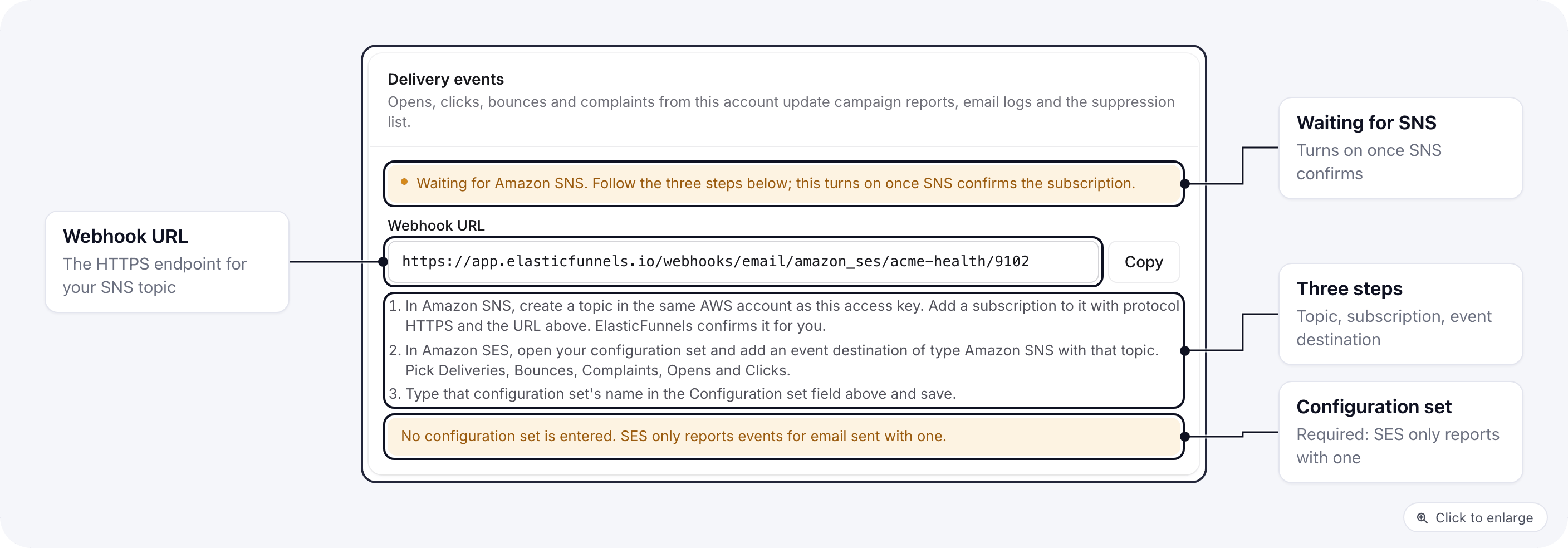 SES sends events through Amazon SNS, which you set up in your AWS account. Save the SES account
first: the card then shows the **Webhook URL**.
In Amazon SNS, create a topic in the same AWS account as the access key you pasted. Add a
subscription to it with protocol **HTTPS** and the **Webhook URL** from the card. Leave raw
message delivery off. ElasticFunnels confirms the subscription for you.
In Amazon SES, open your configuration set and add an event destination of type **Amazon SNS**
with that topic. Pick **Deliveries**, **Bounces**, **Complaints**, **Opens** and **Clicks**.
Type that configuration set's name in the account's **Configuration set** field and save.
The card reads **Waiting for Amazon SNS** until SNS confirms the subscription, then turns to
**On**. The configuration set is required: SES only reports events for email sent with one, and
the card warns you while the field is empty.
ElasticFunnels only accepts SNS messages with a valid Amazon signature from a topic in the same
AWS account as your access key. A topic in another AWS account is refused, even when it points at
the right URL.
## In the campaign settings
When you pick a sending account for a campaign, its delivery tracking card shows **Receiving
events** once the webhook is on. For Postmark, Brevo, Resend and Amazon SES it shows **Not set up**
otherwise, with an **Open account** link to the account page where the webhook is set up. A
campaign sent without events still goes out. Its report then has no opens, clicks or bounces.
## Related docs
* [Email Sending Accounts](/emails/sending-accounts): connect SES, Postmark, Brevo and Resend
* [Emails Not Sending](/emails/troubleshooting): the email log and what each status means
* [Emails overview](/emails/overview): templates, campaigns and who sends your email
This documentation is built and hosted on [Mintlify](https://mintlify.com), a developer documentation platform.
SES sends events through Amazon SNS, which you set up in your AWS account. Save the SES account
first: the card then shows the **Webhook URL**.
In Amazon SNS, create a topic in the same AWS account as the access key you pasted. Add a
subscription to it with protocol **HTTPS** and the **Webhook URL** from the card. Leave raw
message delivery off. ElasticFunnels confirms the subscription for you.
In Amazon SES, open your configuration set and add an event destination of type **Amazon SNS**
with that topic. Pick **Deliveries**, **Bounces**, **Complaints**, **Opens** and **Clicks**.
Type that configuration set's name in the account's **Configuration set** field and save.
The card reads **Waiting for Amazon SNS** until SNS confirms the subscription, then turns to
**On**. The configuration set is required: SES only reports events for email sent with one, and
the card warns you while the field is empty.
ElasticFunnels only accepts SNS messages with a valid Amazon signature from a topic in the same
AWS account as your access key. A topic in another AWS account is refused, even when it points at
the right URL.
## In the campaign settings
When you pick a sending account for a campaign, its delivery tracking card shows **Receiving
events** once the webhook is on. For Postmark, Brevo, Resend and Amazon SES it shows **Not set up**
otherwise, with an **Open account** link to the account page where the webhook is set up. A
campaign sent without events still goes out. Its report then has no opens, clicks or bounces.
## Related docs
* [Email Sending Accounts](/emails/sending-accounts): connect SES, Postmark, Brevo and Resend
* [Emails Not Sending](/emails/troubleshooting): the email log and what each status means
* [Emails overview](/emails/overview): templates, campaigns and who sends your email
This documentation is built and hosted on [Mintlify](https://mintlify.com), a developer documentation platform.