> ## Documentation Index
> Fetch the complete documentation index at: https://docs.elasticfunnels.io/llms.txt
> Use this file to discover all available pages before exploring further.
# Connect and remove integrations
> Connect an integration from the screen that needs it, come back after a platform sign-in, and remove a connection from the Integrations list.
You can connect an integration in two places: on **Apps → Integrations** with **New integration**, or from
the screen that needs it. Every **Connect** button outside the Integrations page opens a window right where you
are, listing only the integrations that screen can use.
 ## Connect from the screen you are on
1. Click the screen's connect button (the table below lists them).
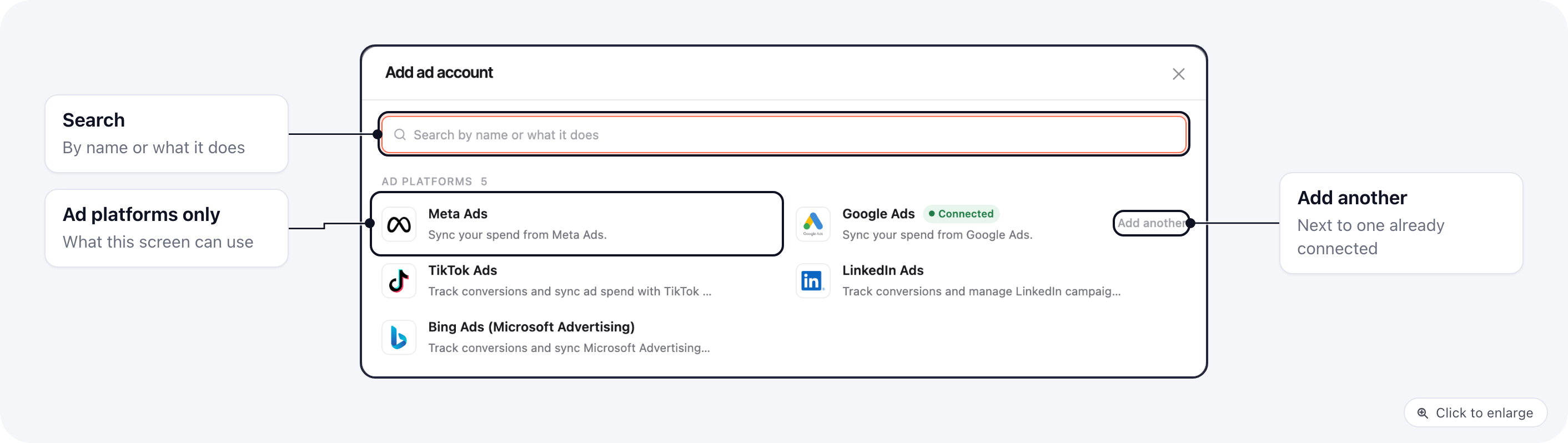
2. Pick the integration. An integration that is already connected shows **Connected**, and **Add another** when
it allows more than one account.
3. Its setup form opens in the same window. Fill it in and click **Connect**.
When it is saved, the window closes and the screen you started from shows the new connection. You do not need
to reload the page.
| Where | Button | What the window lists |
| - | - | - |
| **Reports → Ad Campaigns** | **Add ad account** (also the empty state and the account switcher) | Meta Ads, Google Ads, TikTok Ads, LinkedIn Ads, Bing Ads (Microsoft Advertising) |
| **Emails → Campaigns → Campaign settings** (brands with email campaigns) | **Connect a sending account** | Mailgun, SendGrid, Mailrelay and your own SMTP server |
| **Reports → Fulfillment** | **Connect a fulfillment provider** | Fulfillment providers |
| Subscription setup checklist | **Connect a call center** | Call centers |
| An automation step's account field | **Don't see your account?** → **Connect a new one** | The integration that step uses |
| Automation preset wizard | **Connect** next to a missing integration | That integration |
| Page builder, TrackPlay block | Connect | TrackPlay |
When the screen asks for exactly one integration, the window skips the list and opens its setup form.
### Integrations that sign in on the platform
Meta, Google, TikTok and other platforms that sign you in on their own site still take you there to approve
access. When you come back, the integration's page shows **Back to** and the name of the screen you started
from (for example **Back to Campaign settings**). Click it, or save the page, and you return to that screen.
The way back is kept for 30 minutes.
If you pick an integration that allows only one connection and it is already connected, its page opens with
the same **Back to** button.
## Remove a connection
## Connect from the screen you are on
1. Click the screen's connect button (the table below lists them).
2. Pick the integration. An integration that is already connected shows **Connected**, and **Add another** when
it allows more than one account.
3. Its setup form opens in the same window. Fill it in and click **Connect**.
When it is saved, the window closes and the screen you started from shows the new connection. You do not need
to reload the page.
| Where | Button | What the window lists |
| - | - | - |
| **Reports → Ad Campaigns** | **Add ad account** (also the empty state and the account switcher) | Meta Ads, Google Ads, TikTok Ads, LinkedIn Ads, Bing Ads (Microsoft Advertising) |
| **Emails → Campaigns → Campaign settings** (brands with email campaigns) | **Connect a sending account** | Mailgun, SendGrid, Mailrelay and your own SMTP server |
| **Reports → Fulfillment** | **Connect a fulfillment provider** | Fulfillment providers |
| Subscription setup checklist | **Connect a call center** | Call centers |
| An automation step's account field | **Don't see your account?** → **Connect a new one** | The integration that step uses |
| Automation preset wizard | **Connect** next to a missing integration | That integration |
| Page builder, TrackPlay block | Connect | TrackPlay |
When the screen asks for exactly one integration, the window skips the list and opens its setup form.
### Integrations that sign in on the platform
Meta, Google, TikTok and other platforms that sign you in on their own site still take you there to approve
access. When you come back, the integration's page shows **Back to** and the name of the screen you started
from (for example **Back to Campaign settings**). Click it, or save the page, and you return to that screen.
The way back is kept for 30 minutes.
If you pick an integration that allows only one connection and it is already connected, its page opens with
the same **Back to** button.
## Remove a connection
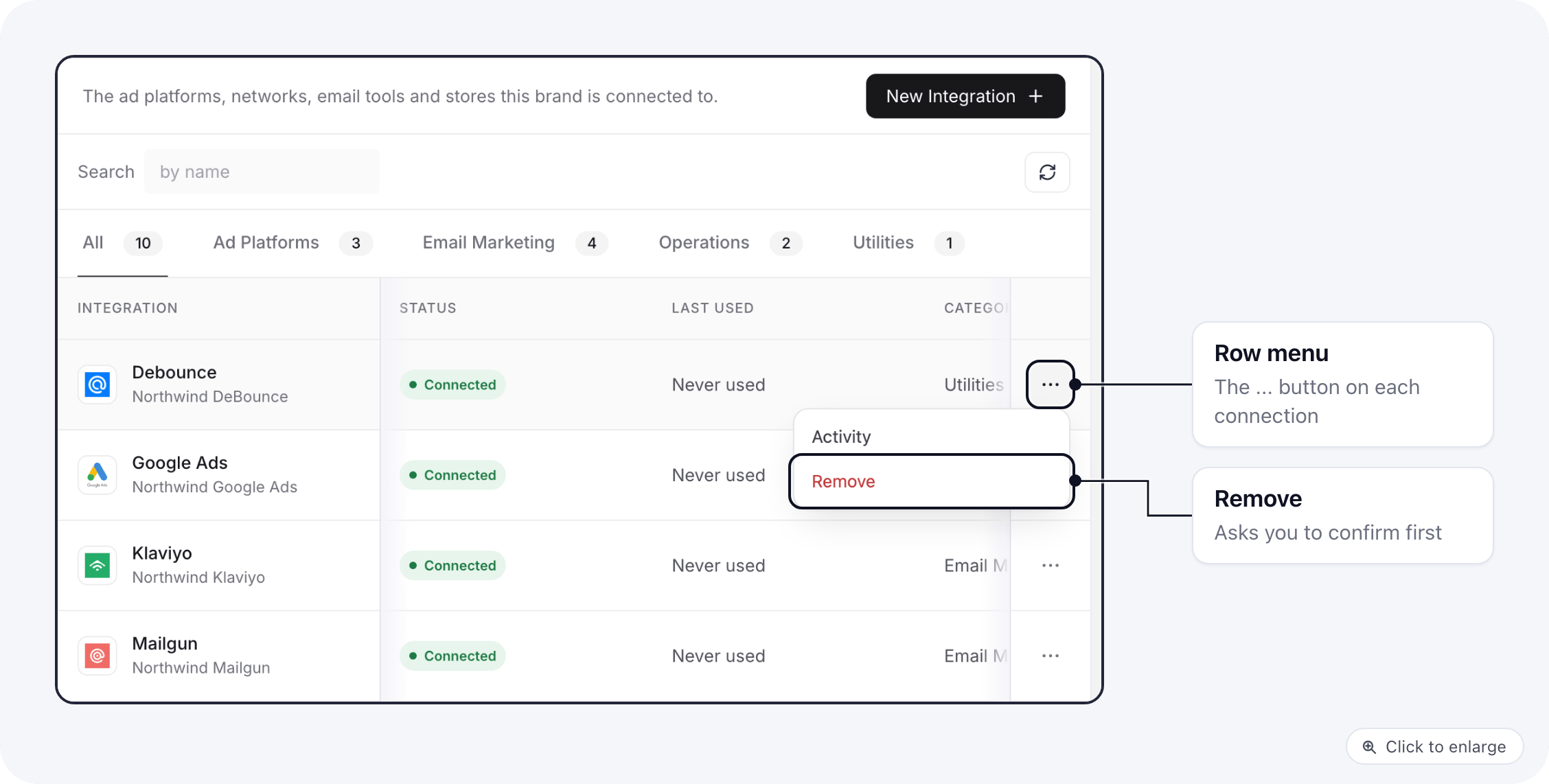 1. Go to **Apps → Integrations**.
2. Click **...** at the end of the connection's row.
3. Click **Remove** (**Disconnect** for Meta Ads) and confirm.
You can also delete a connection from its own page with **...** → **Delete integration**. After that you land
back on the Integrations list.
A connection that a merchant still uses cannot be removed. The message names the reason; change the merchant
first, then remove the connection.
## Related
* [Integration activity, errors and presets](/integrations/integration-health)
* [Campaigns Management](/integrations/campaigns-management)
* [Email marketing integrations](/integrations/email-marketing)
This documentation is built and hosted on [Mintlify](https://mintlify.com), a developer documentation platform.
1. Go to **Apps → Integrations**.
2. Click **...** at the end of the connection's row.
3. Click **Remove** (**Disconnect** for Meta Ads) and confirm.
You can also delete a connection from its own page with **...** → **Delete integration**. After that you land
back on the Integrations list.
A connection that a merchant still uses cannot be removed. The message names the reason; change the merchant
first, then remove the connection.
## Related
* [Integration activity, errors and presets](/integrations/integration-health)
* [Campaigns Management](/integrations/campaigns-management)
* [Email marketing integrations](/integrations/email-marketing)
This documentation is built and hosted on [Mintlify](https://mintlify.com), a developer documentation platform.