> ## Documentation Index
> Fetch the complete documentation index at: https://docs.elasticfunnels.io/llms.txt
> Use this file to discover all available pages before exploring further.
# Page Settings
> Title, URL, domain, page type, SEO, security, tracking and sharing for a page, and which of them every version of the page shares
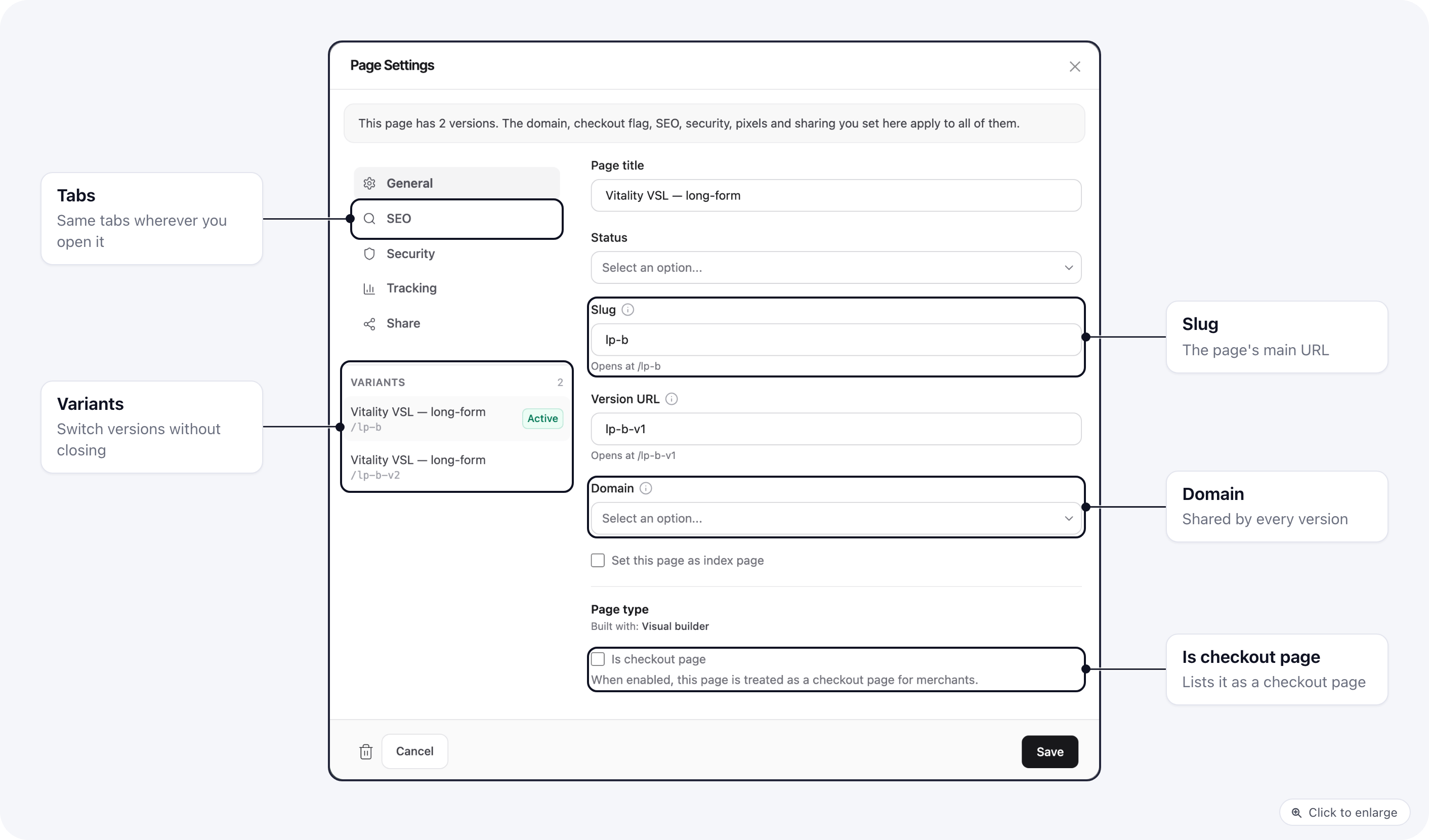
Page settings hold everything about a page except its content: its title and URL, the domain it
answers on, whether it is a checkout page, its SEO, who can see it, the pixels it loads and whether
others can clone it.
 ## Where to open it
The same dialog opens from every place you can edit a page, with the same tabs and fields:
* **Pages list**: the row's **Settings** action.
* **Visual builder**: the gear at the bottom of the left rail.
* **Visual builder, Versions panel**: the gear next to a version.
* **Code editor**: the page's settings in the file tree, or Ctrl/Cmd + E on the open page.
* **Quiz builder**: the settings mode of the quiz's page.
The only difference is the footer. From the Pages list there is also **Save and go to builder**
(or **Save and go to editor** for a code page). Inside the builder or editor there is just **Save**,
because you are already there.
## General
| Field | What it does |
| - | - |
| **Page title** | The page's name in ElasticFunnels: the Pages list, pickers and reports. |
| **Status** | Published, Draft or Offline. Offline takes the page down. |
| **Folder** | Shown when folders are switched on for the project. |
| **Slug** | The address after the domain, for example `offer` for `example.com/offer`. Left empty, one is created from the title. The line under the field shows the full path. |
| **Version URL** | Shown once the page has versions. The address that opens this version directly, for example `offer-v1`. |
| **Domain** | Limits the page to one domain. **Global** (no domain) serves it on all of them. |
| **Set this page as index page** | The page answers on the domain's root (`example.com/`) as well. |
| **Page type** | **Built with** shows whether the page is a Visual builder or Code editor page (set when the page is created). |
| **Is checkout page** | Treats the page as a checkout page for merchants: it shows up in checkout-page pickers and runs as a checkout. Shown when payments are set up for the project. |
| **Disabled Default Scripts** | Code editor pages only. Stops loading the default ElasticFunnels scripts and styles. |
Hover the next to a field name for a short explanation.
## SEO
Title, favicon, a title shown while the tab is in the background, meta description, and whether
the page is listed in `sitemap.xml` and `llms.txt` (see [SEO](/pages/seo)). Code editor pages write
their own ``, so they have no SEO tab.
## Security
Funnel-only access (visitors who did not come through a funnel are sent to the index page),
disable right click, prevent search engine indexing, require login (with the URL to send logged-out
visitors to) and require a password.
## Tracking
Show affiliate pixels, mark the page as an upsell page (only the affiliate upsell pixels fire),
the Google Analytics measurement ID, the Meta pixel ID, custom JavaScript and custom header code.
## Share
Lets other ElasticFunnels projects clone the page: open to anyone, behind a secret key, or only for
users who signed up with one of your referral codes.
## Pages with versions
A page with [versions](/pages/page-variants) is one page with several versions of its content. Some
settings belong to the page and are the same on every version; the rest each version has on its own.
| Shared by every version (set on the primary page) | Each version has its own |
| - | - |
| Slug (the page's main URL), domain, index page, folder | Page title |
| Is checkout page | Status |
| SEO: title, favicon, background-tab title, meta description, sitemap | Version URL |
| Security: funnel-only, right click, indexing, login, password | Custom JavaScript and custom header code |
| Affiliate pixels, upsell page, Google Analytics ID, Meta pixel ID | Disabled Default Scripts (code pages) |
| Share | |
## Where to open it
The same dialog opens from every place you can edit a page, with the same tabs and fields:
* **Pages list**: the row's **Settings** action.
* **Visual builder**: the gear at the bottom of the left rail.
* **Visual builder, Versions panel**: the gear next to a version.
* **Code editor**: the page's settings in the file tree, or Ctrl/Cmd + E on the open page.
* **Quiz builder**: the settings mode of the quiz's page.
The only difference is the footer. From the Pages list there is also **Save and go to builder**
(or **Save and go to editor** for a code page). Inside the builder or editor there is just **Save**,
because you are already there.
## General
| Field | What it does |
| - | - |
| **Page title** | The page's name in ElasticFunnels: the Pages list, pickers and reports. |
| **Status** | Published, Draft or Offline. Offline takes the page down. |
| **Folder** | Shown when folders are switched on for the project. |
| **Slug** | The address after the domain, for example `offer` for `example.com/offer`. Left empty, one is created from the title. The line under the field shows the full path. |
| **Version URL** | Shown once the page has versions. The address that opens this version directly, for example `offer-v1`. |
| **Domain** | Limits the page to one domain. **Global** (no domain) serves it on all of them. |
| **Set this page as index page** | The page answers on the domain's root (`example.com/`) as well. |
| **Page type** | **Built with** shows whether the page is a Visual builder or Code editor page (set when the page is created). |
| **Is checkout page** | Treats the page as a checkout page for merchants: it shows up in checkout-page pickers and runs as a checkout. Shown when payments are set up for the project. |
| **Disabled Default Scripts** | Code editor pages only. Stops loading the default ElasticFunnels scripts and styles. |
Hover the next to a field name for a short explanation.
## SEO
Title, favicon, a title shown while the tab is in the background, meta description, and whether
the page is listed in `sitemap.xml` and `llms.txt` (see [SEO](/pages/seo)). Code editor pages write
their own ``, so they have no SEO tab.
## Security
Funnel-only access (visitors who did not come through a funnel are sent to the index page),
disable right click, prevent search engine indexing, require login (with the URL to send logged-out
visitors to) and require a password.
## Tracking
Show affiliate pixels, mark the page as an upsell page (only the affiliate upsell pixels fire),
the Google Analytics measurement ID, the Meta pixel ID, custom JavaScript and custom header code.
## Share
Lets other ElasticFunnels projects clone the page: open to anyone, behind a secret key, or only for
users who signed up with one of your referral codes.
## Pages with versions
A page with [versions](/pages/page-variants) is one page with several versions of its content. Some
settings belong to the page and are the same on every version; the rest each version has on its own.
| Shared by every version (set on the primary page) | Each version has its own |
| - | - |
| Slug (the page's main URL), domain, index page, folder | Page title |
| Is checkout page | Status |
| SEO: title, favicon, background-tab title, meta description, sitemap | Version URL |
| Security: funnel-only, right click, indexing, login, password | Custom JavaScript and custom header code |
| Affiliate pixels, upsell page, Google Analytics ID, Meta pixel ID | Disabled Default Scripts (code pages) |
| Share | |
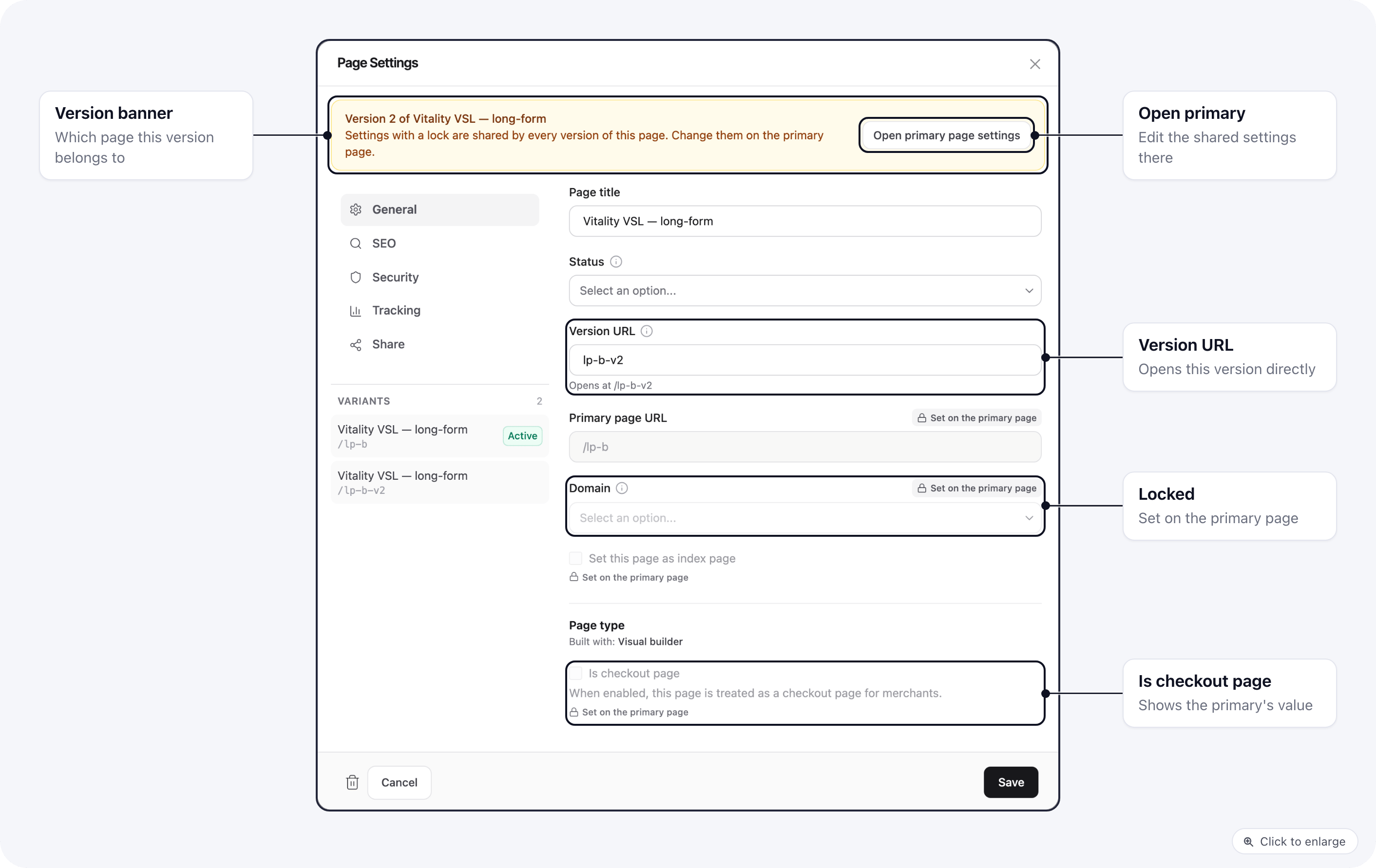 * **On the primary page** (the live version), a note at the top says how many versions the page
has. Shared settings you save there apply to all of them.
* **On any other version**, a banner says which page it is a version of. Shared settings show
their current value with a lock and **Set on the primary page**; tabs where everything is shared
say so at the top. **Open primary page settings** switches the dialog to the primary page.
* The **Variants** list on the left of the dialog switches between versions without closing it.
* **Setting a version live** keeps the page's shared settings: the new live version takes over the
domain, checkout flag, SEO, security, pixels and sharing, and the index page flag moves with it.
Custom code stays per version so each version in a split test can load its own script. Pixel IDs
are shared so every version reports to the same place, which keeps the test readable.
## Related
* [Page Variants](/pages/page-variants)
* [SEO](/pages/seo)
* [Create a landing page](/pages/create-landing-page)
This documentation is built and hosted on [Mintlify](https://mintlify.com), a developer documentation platform.
* **On the primary page** (the live version), a note at the top says how many versions the page
has. Shared settings you save there apply to all of them.
* **On any other version**, a banner says which page it is a version of. Shared settings show
their current value with a lock and **Set on the primary page**; tabs where everything is shared
say so at the top. **Open primary page settings** switches the dialog to the primary page.
* The **Variants** list on the left of the dialog switches between versions without closing it.
* **Setting a version live** keeps the page's shared settings: the new live version takes over the
domain, checkout flag, SEO, security, pixels and sharing, and the index page flag moves with it.
Custom code stays per version so each version in a split test can load its own script. Pixel IDs
are shared so every version reports to the same place, which keeps the test readable.
## Related
* [Page Variants](/pages/page-variants)
* [SEO](/pages/seo)
* [Create a landing page](/pages/create-landing-page)
This documentation is built and hosted on [Mintlify](https://mintlify.com), a developer documentation platform.