
What the buyer sees
- The buyer clicks the upsell button.
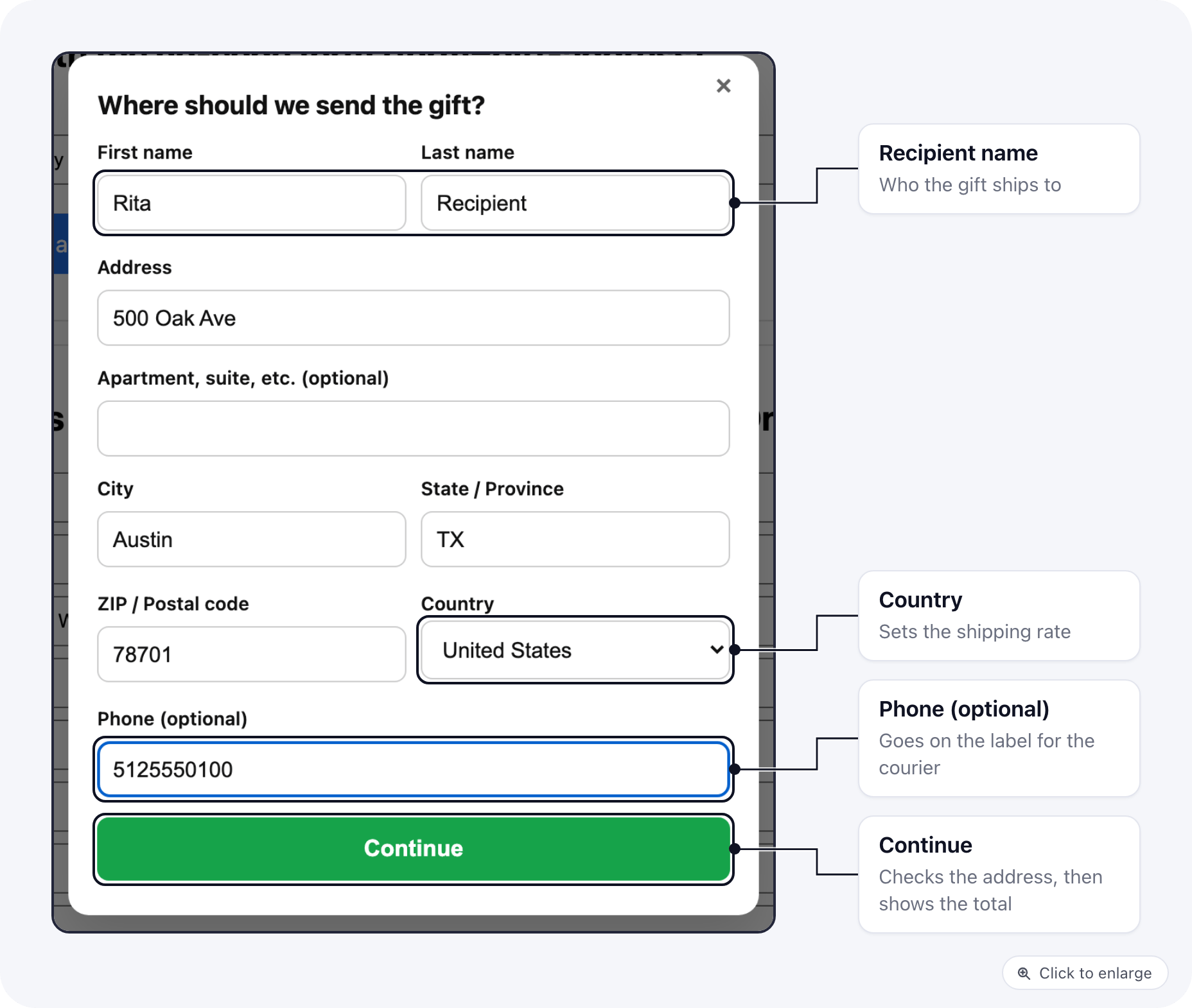
- A form opens over the page: name, address, city, state, ZIP/postal code, country, and an optional phone.
- The buyer clicks Continue. ElasticFunnels checks the address and works out shipping for that country from the product’s shipping profile.
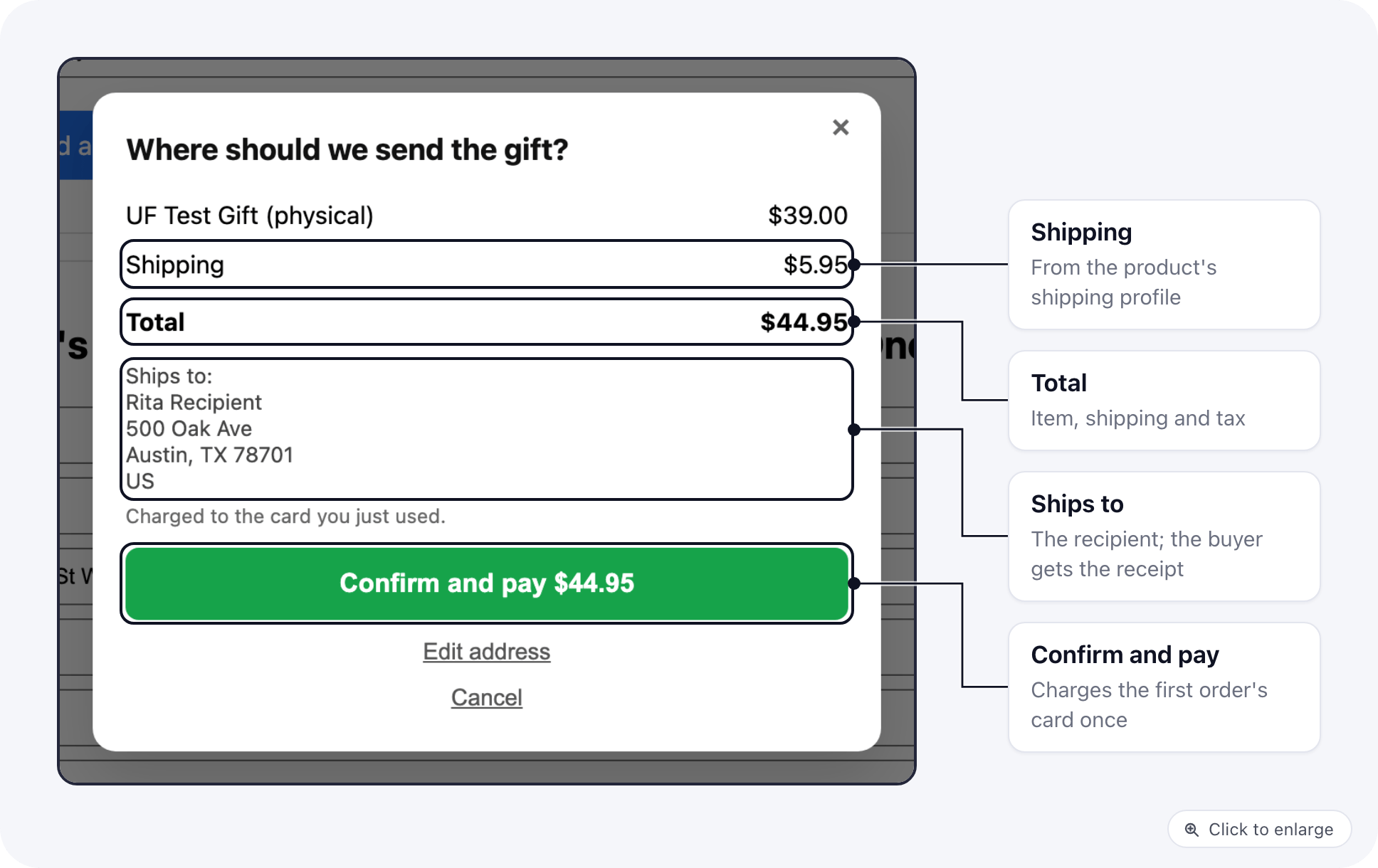
- A summary shows the item, shipping, tax and the total, plus the ship-to address. The button reads Confirm and pay $X.
- On confirm, the card on file is charged once and the funnel moves to the next step, the same as a normal one-click upsell.
Option 1: no code, add form= to the upsell tag
Add a form option to an upsell or downsell link tag:
Any input on the page with a
data-ef-upsell-field attribute is sent along as a custom field:
Option 2: your own form, call ef.quickBuy
If the page already has its own gift form, pass what it collected to ef.quickBuy. ElasticFunnels validates it, shows the summary with shipping, and charges on confirm.
ef.quickBuy does not leave the page on its own: send the buyer to result.nextUrl when you are ready. Pass redirect: true to have it go there for you.
The address keys also accept the names most page forms already use: address1, region or province, postal_code or postcode, firstName, lastName. country is the two-letter code (US, CA, GB). State is required for the US, Canada and Australia.
Options
To get the price with shipping without charging (for example to show it in your own layout), call
ef.quickBuy.quote(code, { ship_to }).
Example: a page whose gift form calls handleLovedOneGift
Some landing pages ship with their own “send one to a loved one” form that calls a function named handleLovedOneGift with the package the buyer picked and the address they typed. Map each package to its product code and hand the rest to ef.quickBuy:
Shipping and tax
- Shipping is charged from the product’s shipping profile for the ship-to country (and state, where the profile has state rates), not the buyer’s address.
- A product whose profile has no rate for that country cannot be sent there: the form says so before anything is charged.
- A product with no shipping profile, or a profile with no rates, ships free.
- Tax is worked out for the ship-to address the same way as on checkout.
What is saved on the order
- The upsell order’s shipping name and address are the recipient’s. The customer and billing details stay the buyer’s, so receipts and tracking emails go to the buyer.
- The recipient’s phone, the gift mark and your custom fields are saved as order flags.
- Fulfillment providers get the recipient’s name, address and phone on the label.
Limits
- Works with NMI, Stripe and the Test merchant (the gateways that charge a stored card for one-click upsells). With other merchants the form shows an error and nothing is charged.
- If the first order was paid with PayPal, or with Apple Pay on an NMI merchant that does not store the card, a form that asks for an address says the offer cannot be sent to another address and charges nothing. Give those buyers a plain upsell link next to the gift one.
- Needs an active purchase session, like every one-click upsell. If the session has ended the form says so.
- If the buyer already bought that upsell in this session, the form says so and does not charge again. Clicking Confirm twice also charges once.
- The form needs JavaScript. Without it, a link with
form=gift-addressorform=addressshows a short “not available” message and charges nothing, so an order never ships to the wrong address. Aform=fieldslink works as a plain upsell without the fields.