
Overview
Telnyx can be the carrier behind your brand’s texts. Connect a Telnyx account, add one of its numbers as a sender, and texts from the Send SMS step, test sends and the automatic STOP, HELP and START replies go out through Telnyx. Each text passes the checks in Settings -> SMS before it leaves: suppression list, quiet hours, consent and state rules. Telnyx has no automation steps of its own; it works as a sender, the same way a Twilio number does. Telnyx bills you directly for each text, with no ElasticFunnels markup. Only US numbers can be texted for now.What you need in Telnyx
- A Telnyx account with a balance, and messaging turned on for it.
- A number with messaging, or a messaging profile. Carriers filter texts from senders that are not registered:
- An API key and your public key, both under Keys & Credentials in the
Telnyx portal:
- API key: on the API Keys tab, create a key and copy it. It starts with
KEY. - Public key: on the Public Key tab. Telnyx signs every webhook it sends, and ElasticFunnels
uses this key to check the signature. It is a 44-character code ending in
=.
- API key: on the API Keys tab, create a key and copy it. It starts with
Connect Telnyx
1
Open Telnyx in Integrations
Go to Apps -> Integrations and open Telnyx. Click Add connection.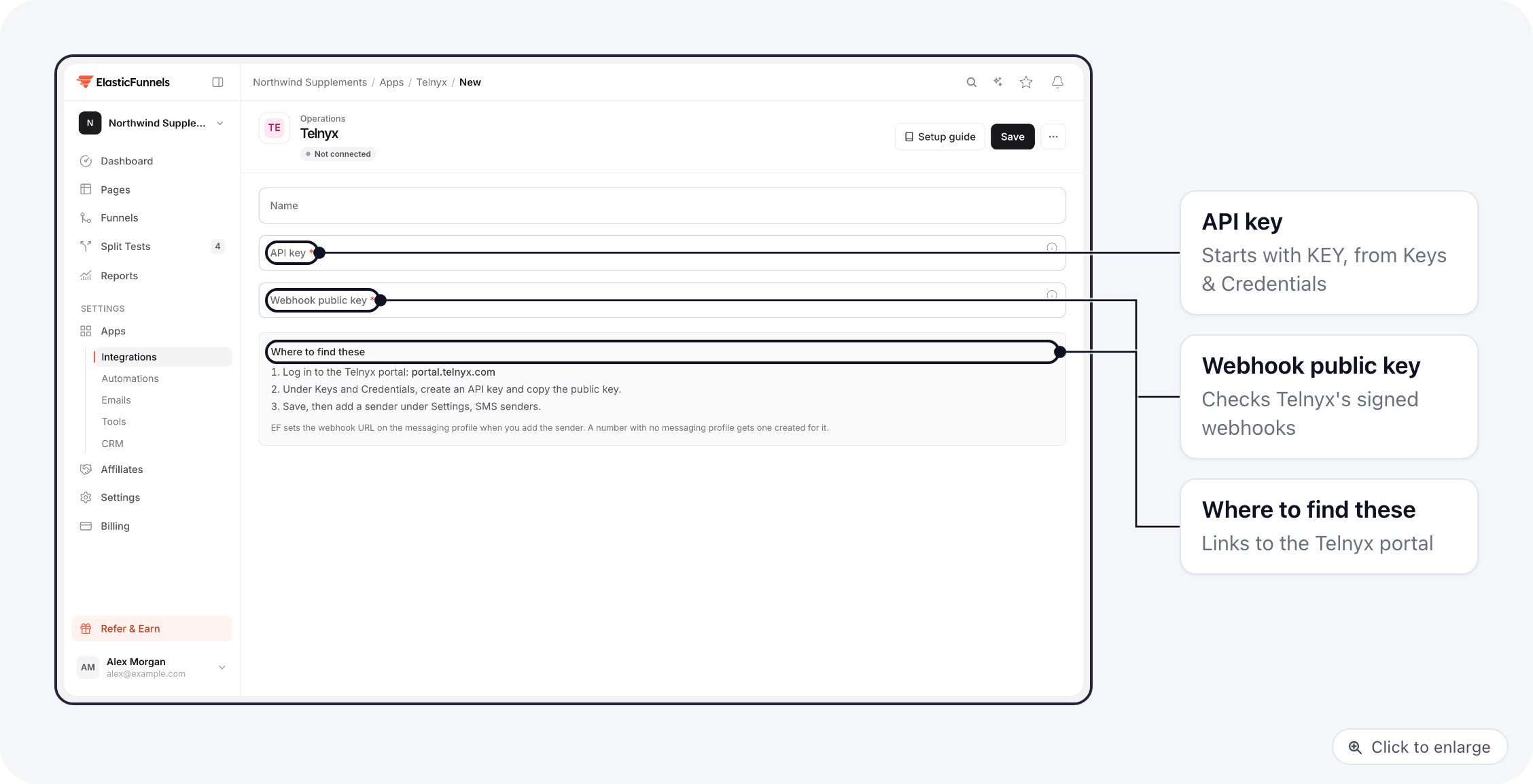
2
Paste the keys
Give the connection a Name (for example “Telnyx main account”), paste the API key and the
Webhook public key, and save. Both are required. The API key is stored encrypted.
3
Add a sender
In Settings -> SMS -> Senders, click Add sender. Under SMS provider account choose
the Telnyx connection, then pick a Number. The list has your Telnyx numbers and your messaging
profiles (shown as messaging services). A number marked (no messaging profile) is not on a profile
yet; the next step fixes that.Turn on Default sender if steps that do not pick a sender should use this one, then save.
4
Click Configure webhooks
Click Configure webhooks in the sender’s row so Telnyx sends replies to ElasticFunnels. The next
section says what it changes in Telnyx.
5
Check the registration
Click Refresh in the Registration column. For a local number ElasticFunnels asks Telnyx whether
it is assigned to a 10DLC campaign; for a toll-free number, whether its verification is approved. You
see Registered, Pending, Rejected or Unknown. A messaging profile stays at Unknown.
6
Accept the consent statement
On the Compliance tab, accept the marketing consent statement. Until then, marketing texts are
skipped. See SMS compliance.
Replies and delivery reports
You do not paste a webhook URL into Telnyx. Configure webhooks sets it:- Replies. Telnyx sends incoming texts to the webhook URL of the number’s messaging profile.
ElasticFunnels sets that URL (API version 2) to your brand’s address, which contains
/api/webhook/sms/telnyx/. A number with no messaging profile gets a new profile namedElasticFunnels brand <your brand ID>, and the number is moved onto it. - Delivery reports. Each text ElasticFunnels sends names its own report address and tells Telnyx to skip the profile’s, so reports arrive even if the profile’s URL changes later.
Send a test
- Go to Settings -> SMS -> Test send.
- Use a number you own, choose the Telnyx sender, a type and a short message, and send. The tab shows whether the text was sent, is waiting or was skipped, and why.
- In Settings -> Logs -> SMS the text should reach Delivered within a minute or so.
- Text STOP back from your phone. The reply appears under Replies, your number goes on the Suppression list and you get the STOP reply. START lifts it.
Troubleshooting
No replies and no delivery reports
No replies and no delivery reports
Check the Webhook public key in the integration against Keys & Credentials -> Public Key
in Telnyx; a key from a different Telnyx account fails every check. Then click Set again on the
sender, and confirm in Telnyx that the number’s messaging profile has the ElasticFunnels webhook URL.
The integration will not save
The integration will not save
The API key must be a V2 key starting with
KEY. The public key is the base64 key from the
Public Key tab (44 characters, ending in =), not the API key."This number is not in the connected Telnyx account"
"This number is not in the connected Telnyx account"
The number was released or belongs to another Telnyx account. Remove the sender and add a number from
the account this integration uses.
"Could not reach Telnyx" or the number list is empty
"Could not reach Telnyx" or the number list is empty
Telnyx refused the API key or did not answer. Create a new key in Telnyx and save it in the integration.
The list shows up to 100 numbers and 50 messaging profiles.
A text failed: what the Telnyx error means
A text failed: what the Telnyx error means
Click the text in Settings -> Logs -> SMS to see Telnyx’s error code and what it means.
A suppressed number gets no texts until the person texts START or you lift it.
The log says Twilio for a Telnyx text
The log says Twilio for a Telnyx text
A few reasons in the log are still worded for Twilio, for example “Twilio rejected the text”. For a
Telnyx sender they mean Telnyx, and the error code shown with them is Telnyx’s.
Related docs
- SMS compliance: the checks every text passes, senders and the SMS log
- Send SMS step: text customers from an automation
- Plivo and Twilio: the other providers you can send through